 Ptah
PtahGenerate migrations
Plan and generate migration files from the difference between your desired schema and a live database.
A migration pair has two origins. Ptah can derive it from the difference
between a desired schema and a live database, or you can write it with
ptah migrations create when a change is not representable as schema state.
The main path below derives the pair. Write a migration by hand covers the manual origin. Both produce the same files, sealed and applied the same way.
Prerequisites: an installed ptah binary. The main path uses one SQL file and
local SQLite databases, so it needs no Go toolchain, database server, Docker,
or repository checkout. You can generate a migration without Go from SQL,
YAML, HCL, or DBML.
Generate a migration without Go
Section titled “Generate a migration without Go”Start in an empty directory. The database does not need to exist yet:
mkdir ptah-generatecd ptah-generatemkdir migrationsSave this desired schema as schema.sql:
CREATE TABLE users ( id INTEGER PRIMARY KEY AUTOINCREMENT, email TEXT NOT NULL UNIQUE, name TEXT);Generate migrations from SQL, YAML, HCL, DBML, or Go annotations
Section titled “Generate migrations from SQL, YAML, HCL, DBML, or Go annotations”The walkthrough below uses SQL. These are the exact source forms accepted by
migrations plan and migrations generate; keep the remaining flags from the
walkthrough unchanged.
| Source | Copyable source flags | Source-specific condition |
|---|---|---|
| SQL file | --schema-file ./schema.sql |
Uses Ptah’s DDL parser subset; --schema-format sql is only for an external program. |
| YAML file | --schema-file ./schema.yaml |
Uses Ptah YAML objects; the file extension selects YAML. |
| HCL file | --schema-file ./schema.hcl --var tenant=main |
Uses the Atlas-compatible HCL subset plus Ptah extensions; add each variable with --var. |
| DBML file | --schema-file ./schema.dbml |
DBML covers its supported table, key, index, relationship, and note subset. |
| Go annotations | --root-dir ./models |
Uses the native Go annotation model and therefore requires Go source. |
| External program | --schema-cmd "./load-schema --tenant acme" --schema-format sql |
Ptah starts the program directly, without a shell. Its stdout must be SQL, HCL, or YAML. |
| Configured external source | --config ./ptah.yaml --allow-external-schema |
The opt-in is mandatory; the selected block emits SQL, HCL, or YAML. |
| OCI artifact | --schema-file oci://registry.example/acme/app-schema:v1 |
The artifact contains canonical HCL; registry credentials come from the Docker credential store. |
| Composite source | --schema-file ./schema.sql --schema-file ./shared.yaml --schema-file ./vendor.hcl |
Repeat inputs; compatible objects merge and conflicting definitions fail. |
The generated source-support manifest distinguishes a verified command/source path from an accepted path that still lacks a focused command test. Source transport does not expand a format’s expressiveness: DBML, for example, does not acquire every HCL object merely because both flags reach the same command.
Preview the SQL with plan
Section titled “Preview the SQL with plan”ptah migrations plan resolves the desired schema, reads the live database,
and prints the migration SQL with a safety classification — without writing
any files:
ptah migrations plan --schema-file ./schema.sql --db-url "sqlite://app.db"Expected output on standard output:
Safety classification:  #  severity      subject                  reason  1  safe         *ast.CreateTableNode     does not remove data or tighten constraints=== MIGRATION SQL ===
CREATE TABLE "users" (  "id" INTEGER PRIMARY KEY AUTOINCREMENT,  "email" TEXT NOT NULL UNIQUE,  "name" TEXT);
Generated 1 migration statements.
Because the database is empty, the difference is the whole schema. On a migrated database the plan contains only the delta.
Send the plan verdict to CI
Section titled “Send the plan verdict to CI”Use --report json when automation needs the safety verdict:
ptah migrations plan --schema-file ./schema.sql --db-url "sqlite://app.db" --report jsonThis form writes one safety.Report JSON document to standard output. Its
highest field carries the highest operational risk, destructive is the
blocking destructive verdict, and assessments lists every rendered
statement assessment. It does not print migration SQL or write migration
files. Run the default text plan separately when reviewers also need the SQL,
as the CI workflow does.
PostgreSQL desired SQL may include conditional role-bootstrap blocks. Their supported declarations are interpreted without executing SQL on the comparison database. Generation against replayed history still needs the existing disposable-server authorization for role-affecting migrations.
Generate the migration files
Section titled “Generate the migration files”ptah migrations generate --schema-file ./schema.sql --db-url "sqlite://app.db" --migrations-dir ./migrations --name initExpected output on standard output:
Generated migration files for sqlite://app.db:The file names follow it:
UP: .../migrations/1785255952_init.up.sqlDOWN: .../migrations/1785255952_init.down.sqlThe version prefix is a timestamp; --name becomes the description in the
file name. Ptah writes both directions — the generated down file reverses the
up file:
-- Migration rollback-- Direction: DOWN
-- WARNING: This will delete all data!DROP TABLE IF EXISTS "users";
On MySQL and MariaDB, migrations up runs a file inside a transaction unless
the file opts out, and refuses one whose statements it cannot tie to that
transaction: a trigger, view or routine definition, LOCK TABLES, or a
statement on a table a trigger fires on. generate asks the migrator about
each file it writes, against the database it compared with, and starts a file
it would refuse with -- +ptah no_transaction. The down file of a refused up
file gets the directive too, because it runs after the up file has changed the
catalog. Such a file keeps its lock and statement timeouts.
The comparison leaves out the tables migrations up keeps its history in, so a
generated file never drops them. Ptah’s own schema_migrations,
schema_migrations_log and the ptah_migration_tags table that migrations tag records in are left out on every dialect, by every command that reads a
database. A revision table under
another name, or in the Atlas format, is left out when generate and
migrations plan get the same --migrations-table and --revision-format that
migrations up uses, or read them from migration.revisions_table and
migration.revision_format in ptah.yaml. Without them, such a table is compared as an ordinary table and the
plan drops it.
Pass --report json to publish a machine-readable safety artifact with each
generated pair. generate writes
<version>_<name>.safety.json beside the up and down files and prints its path
as REPORT: ...; unlike plan --report json, it does not write the JSON to
standard output. HTML reports follow the same rule with a .safety.html
suffix.
Review the HTML safety report
Section titled “Review the HTML safety report”The deterministic fixture starts with a SQLite table that has a legacy column, then asks Ptah to remove that column. SQLite performs the change as a physical table rebuild, so the report retains the destructive verdict, affected statement, and reason beside the generated migration pair. It opens with how many statements fall in each severity, which is the question a reviewer opens a safety report to answer, and it is self-contained: opening it fetches nothing and it follows the reader’s light or dark preference.
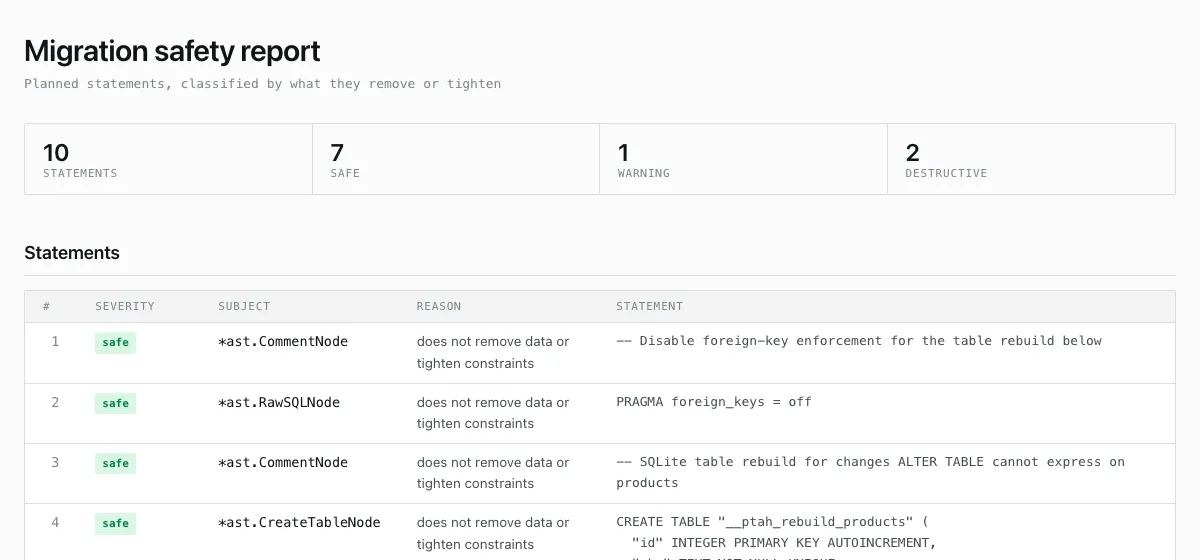
A real `migrations generate --report html` artifact for a destructive SQLite table rebuild.
What to notice: The severity counts sit above the table, and the affected statement and reason are visible beside each verdict, so a reviewer does not need to infer risk from generated SQL alone.
Reproduce this output
ptah schema apply --schema-file docs/site/fixtures/product-output/current.sql --db-url sqlite://current.db --auto-approve
ptah migrations generate --schema-file docs/site/fixtures/product-output/schema.sql --db-url sqlite://current.db --migrations-dir ./generated --name remove_legacy_inventory --report html
The full-size action opens the versioned HTML artifact inside the documentation. The screenshot shows its first view; the downloadable report is the review record.
When the desired schema and the database already match, generate writes
nothing and exits 0.
Hash the directory
Section titled “Hash the directory”Generation does not update the integrity file; sealing the directory is an explicit step so the hash always reflects what you reviewed:
ptah migrations hash --dir ./migrationsptah migrations validate --dir ./migrationsExpected output on standard output:
Wrote ./migrations/ptah.sum2 migration file(s) hashedOK: migrations directory matches ptah.sumCommit the migration pair and ptah.sum together, then continue with
Apply migrations.
Generate from a composite desired schema
Section titled “Generate from a composite desired schema”plan and generate resolve the same composite desired schema as
ptah schema render and ptah schema compare. This example keeps three
source-owned fragments separate and requires no Go toolchain:
ptah migrations generate \ --schema-file ./schema.sql \ --schema-file ./shared.yaml \ --schema-file ./vendor/billing.hcl \ --db-url "$DATABASE_URL" \ --migrations-dir ./migrationsPtah merges the sources before reading the live schema. Identical named objects are deduplicated; a same-identity object with different desired properties is a conflict, and no migration files are written. See Composite desired schema for source identity and conflict rules.
Verify on a shadow database
Section titled “Verify on a shadow database”Add --shadow-db to replay the whole directory — including the new migration
— on a disposable
shadow database before
any files are kept. The shadow
database is dropped clean, migrated up, rolled back one step, and migrated up
again, so both directions of the new migration are proven executable:
ptah migrations generate \ --schema-file ./schema.sql \ --db-url "$DATABASE_URL" \ --migrations-dir ./migrations \ --name add_posts \ --shadow-db "sqlite://shadow.db"The replay log comes before the generated files:
INFO Applying migration version=1785255953 description=add_postsINFO Rolling back migration version=1785255953 description=add_postsINFO Applying migration version=1785255953 description=add_postsGenerated migration files for ...The shadow database must be an ephemeral database of the same engine as the target and must identify a different live database realm. Never point it at a real environment: one that holds a table, a view or anything else the reset would drop is refused before anything is dropped, and the run empties it again when it finishes.
Before shadow verification, Ptah captures the existing migration directory
once and checks ptah.sum when the directory is hashed. The shadow run replays
that snapshot rather than reopening the path. Publication then compares the
bound output directory with the authorized snapshot; if history changed during
generation, no migration or refreshed checksum is written.
Generate without the target database (replay)
Section titled “Generate without the target database (replay)”--replay derives the current state without any access to the target
database: the existing directory is replayed on a disposable --dev-url
database (reset destructively first, and refused if it already holds anything
the reset would drop),
and the next migration is generated
from the difference between that replayed state and the desired sources. CI
can generate the next migration from the repository alone:
ptah migrations generate \ --replay \ --dev-url "sqlite://replay-dev.db" \ --schema-file ./schema.sql \ --migrations-dir ./migrations \ --name add_posts--db-url is rejected in replay mode — the migration directory is the source
of truth for the current state. --dir-format selects the replayed
directory’s layout (auto, ptah, or atlas), and --qualifier prefixes
every object in the generated statements with a custom schema qualifier for
single-schema plans on dialects with schema-qualified names.
Replay mode uses the same integrity boundary as shadow verification: one
captured snapshot is checked, replayed, and retained as the publication
precondition. This prevents a file changed after replay from being folded into
the newly generated ptah.sum or atlas.sum as if the changed bytes had
produced the plan. Under the migration-directory lock, Ptah first recovers an
interrupted prior publication and only then captures and authorizes the state
that will be replayed. A recoverable journal therefore cannot leave temporary
files that make the pre-replay integrity check fail forever.
Write a migration by hand
Section titled “Write a migration by hand”create scaffolds an empty pair for you to fill in. This is a first-class
origin rather than a fallback: a project that describes no desired schema uses
it for every change, and a project that does still reaches for it whenever the
change is one a schema difference cannot express — a data backfill, an index
rebuild, a grant.
ptah migrations create add_invoices --migrations-dir ./migrationsExpected output on standard output:
Generated empty migration files:The file names follow it:
UP: .../migrations/1785255954_add_invoices.up.sqlDOWN: .../migrations/1785255954_add_invoices.down.sqlEdit both files, then re-run ptah migrations hash. Keep the rollback real
even if the first consumer only applies migrations forward; the down half is
part of Ptah’s migration contract. Pass --edit to open the created pair in
$VISUAL/$EDITOR immediately.
Failure modes
Section titled “Failure modes”Destructive changes are classified and can be gated. Removing a column or table from the desired schema produces a plan whose classification names the data risk:
Safety classification: # severity subject reason 2 safe *ast.CreateTableNode does not remove data or tighten constraints 4 destructive users DROP TABLE removes the table and all rows 5 warning *ast.RawSQLNode rename can break deployed readers and writersWith --check-destructive set, plan and generate refuse to proceed and
exit 2:
error: destructive migration statements require AllowDestructiveReview the plan, then rerun with --allow-destructive to accept it. Use the
structured plan report for CI decisions, or
the generated sibling report when an audit artifact must stay with the
migration pair. The apply-time gate on ptah migrations up is separate — see
Lint and gate unsafe SQL.
Conflicting sources stop generation. When two schema sources disagree
about the same database object, Ptah fails with a
conflicting field ... definitions error before connecting to the database;
see Composite desired schema.
Next steps
Section titled “Next steps”- Ready to run the files against a database? Apply migrations.
- Sealing them before they reach a shared environment? Integrity and safety.
- Linting the SQL and gating destructive statements? Lint and gate unsafe SQL.
- Need to reorder or rewrite a migration before it ships? Maintain migration history.