 Ptah
Ptah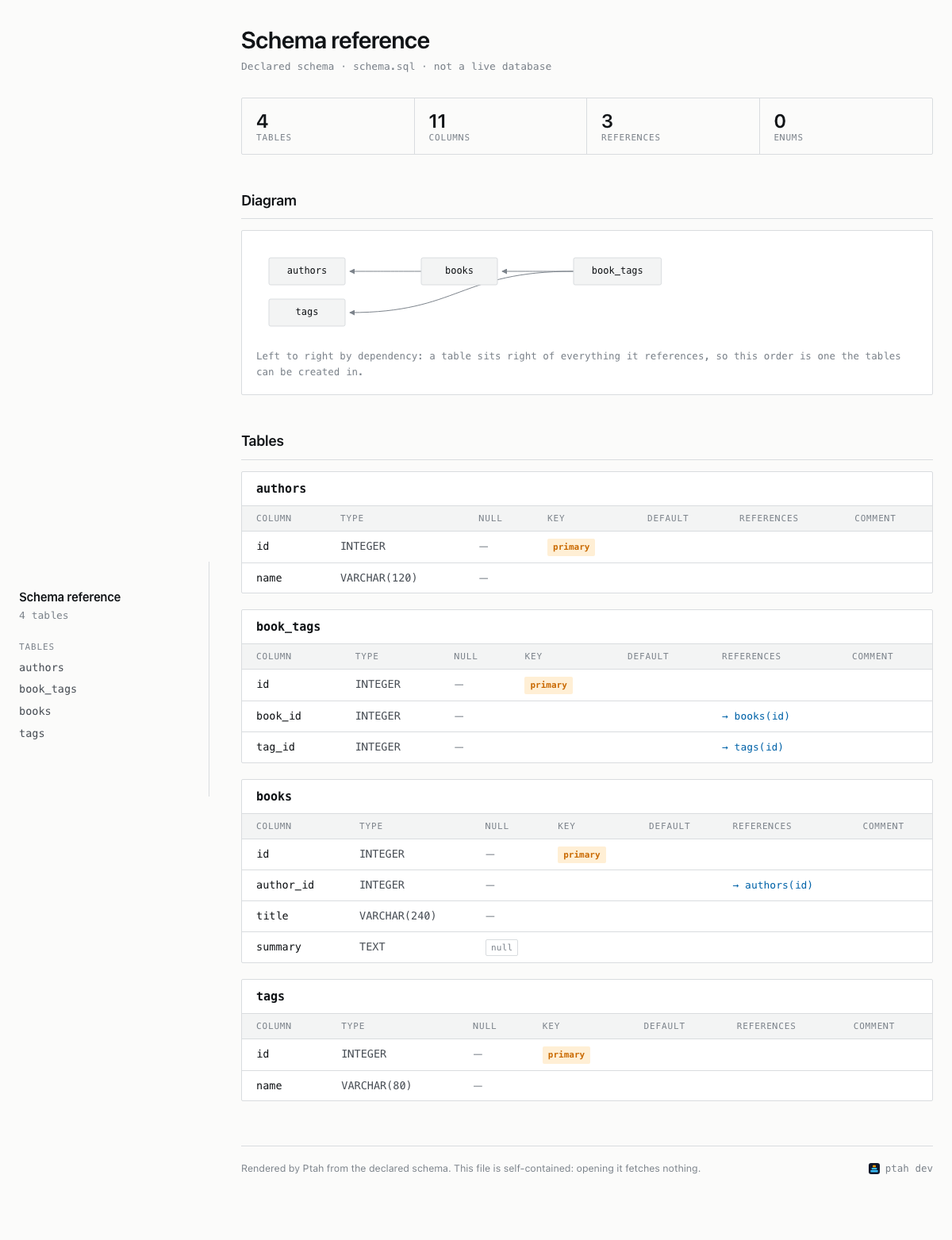
One table and its columns
Write a desired schema as a Markdown reference or a self-contained HTML page with ptah schema export.
ptah schema export --to markdown and ptah schema export --to html write a
desired schema as a document a person reads: one section per table with its
columns, types, nullability, defaults, keys and comments, followed by that
table’s indexes and by the enums the schema declares.
Both targets read the desired schema from the same sources ptah schema render
reads. Neither connects to a database, so the document describes what your
schema sources declare and not what a database currently holds. To document a
live database, write an HCL, SQL, or DBML source with
ptah schema inspect, review it, then export that file.
Prerequisites: an installed ptah binary (Install Ptah)
and a desired schema. Nothing else is needed — Ptah lays out the entity diagram
in the HTML output itself, so Graphviz is not involved.
Real self-contained HTML output generated from the source-neutral SQL fixture.
What to notice: The first screen combines navigation, counts, and the relationship map; the table-detail variant shows the column-level lookup below it.
ptah schema export --to html --schema-file docs/site/fixtures/source-equivalence/schema.sql --out schema-document.htmlOne table and its columns
Select Full size to inspect the complete screenshot inside the documentation. Use Fit width to scroll through the page, or 100% to inspect its details. The download is the versioned, self-contained HTML file, so you can inspect its navigation, diagram, and table cards without running a server.
The examples run against one schema file. Save this as schema.yaml:
enums: order_status: values: [pending, shipped, canceled]tables: customers: columns: id: type: INTEGER primary: true email: type: TEXT not_null: true country: type: TEXT not_null: true indexes: idx_customers_country: fields: [country] orders: columns: id: type: INTEGER primary: true customer_id: type: INTEGER not_null: true foreign: customers(id) status: type: order_status not_null: true default: pendingSubstitute your own schema source throughout. Every source
ptah schema render reads works here, a Go annotation
tree behind --root-dir included. See
Document a schema from another source.
| Target | Produces | Choose it when |
|---|---|---|
markdown |
One Markdown document: a heading, an index of the tables, and a section per table. | You commit the document beside the schema, read it in a pull request diff, or paste it into a wiki. |
html |
One HTML file: the same per-table sections, plus a table-of-contents sidebar, a count panel and an entity diagram. | You hand the document to somebody, attach it to a review, or open it on a machine with no network. |
The diagram is the one difference in content: the markdown target emits no
diagram. For a diagram you can commit on its own, in Mermaid, Graphviz DOT or
SVG, use ptah viz.
Leave --out off and the document goes to stdout, which is where you want it
when the next step is a pipe or a redirect:
ptah schema export --to markdown --schema-file schema.yamlExpected output includes:
# Schema reference
- [customers](#customers)- [orders](#orders)
## customers
| Column | Type | Null | Default | Key | Comment || --- | --- | --- | --- | --- | --- || id | INTEGER | yes | — | PK | — || email | TEXT | no | — | — | — || country | TEXT | no | — | — | — |
**Indexes**
- `idx_customers_country` — index on country
## orders
| Column | Type | Null | Default | Key | Comment || --- | --- | --- | --- | --- | --- || id | INTEGER | yes | — | PK | — || customer_id | INTEGER | no | — | FK → customers(id) | — || status | order_status | no | pending | — | — |
## Enums
- `order_status` — pending, shipped, canceled
Tables appear in alphabetical order, and the index at the top links to each one
through the anchor a Markdown renderer derives from its heading. The Enums
section is last and carries one bullet per enum with its values.
Name a file with --out to write the document instead of printing it. Stdout
then carries a receipt rather than the document:
ptah schema export --to markdown --schema-file schema.yaml --out SCHEMA.mdExpected output includes:
Exported schema documentation to .../SCHEMA.mdFound 2 table(s), 6 field(s), 1 enum(s)The receipt names an absolute path even when --out is relative.
ptah schema export --to html --schema-file schema.yaml --out schema.htmlExpected output includes:
Exported schema documentation to .../schema.htmlFound 2 table(s), 6 field(s), 1 enum(s)For the two tables and six columns above, that file is about 14 KB.
Enums group listing each enum by name.Declared schema · <source> · not a live database, naming the schema file by its base name. It says in the file what
this page says above: the document describes what your sources declare.Diagram section holding one inline <svg> element, laid out left to
right by dependency, so reading it in that direction reads an order the
tables can be created in, and a caption saying so.Tables section holding one card per table. Each card carries a column
table with the headers Column, Type, Null, Key, Default,
References and Comment, and, where the table has indexes, a second table
with Index, Columns and Unique. A References cell is a link to the
referenced table’s card, and a Type cell naming a declared enum links to
that enum’s section.Null cell marked null where the column accepts it and — where it does
not, so a nullable column is the one that carries a marker.Rendered by Ptah from the declared schema. This file is self-contained: opening it fetches nothing., beside the Ptah mark, the
version of the binary that wrote the file, and a link to https://ptah.run.
The document travels: it reaches people who did not run the command, and the
link is how one of them finds out what made it.The diagram element names itself, so a reader using a screen reader is told what it is rather than meeting an unlabeled graphic:
<svg viewBox="0 0 335 66" width="335" height="66" role="img" aria-label="Entity relationship diagram">The styling is defined inside the file and follows the reader’s light or dark
preference through a prefers-color-scheme block, rather than picking one. It
uses the fonts the reader’s own system provides, so no web font is fetched, and
the mark in the footer is inlined SVG for the same reason.
The page is self-contained: it loads no stylesheet, font, script or image from anywhere. Check that on a file you are about to publish:
grep -c -E '<script|<link|<img|src=|@import' schema.htmlExpected output includes:
0grep also exits 1, because it matched nothing, and that is the result you
want. The page opens on a machine with no network access, and opening it sends
your schema nowhere.
The file does carry one address, and it is worth seeing which:
grep -o -E 'https?://[^"]+' schema.htmlExpected output includes:
https://ptah.runThat is the footer link. An anchor is inert until somebody clicks it, so it costs the page nothing on open. If you would rather not ship it, the Markdown target has no footer.
--open shows the file as soon as it is written, using whatever the desktop
opens HTML with:
ptah schema export --to html --schema-file schema.yaml --out schema.html --openWith --out the file you named is the one that opens, and the export has
already printed where it is. Without --out the document goes to standard
output, which is nothing a browser can be pointed at, so ptah writes a copy
to a temporary file and names it on standard error:
Schema document written to /tmp/ptah-schema-1699.htmlNothing is uploaded either way: the browser is pointed at a path on your own disk.
A run that cannot open a browser is not a failed run. Under CI, or with no
display, ptah writes the file, says why it did not open it, and exits 0:
not opened: CI is setSet PTAH_SKIP_BROWSER_OPEN=1 to ask for the same on a machine that could have
opened one. Like every boolean PTAH_* variable, a value that is not a boolean
is refused rather than read as the default.
Both targets head the document Schema reference unless --title says
otherwise. --title sets the <h1> of the Markdown document, and the
<title>, the <h1> and the sidebar heading of the HTML page:
ptah schema export --to html --schema-file schema.yaml \ --title "Shop schema" --out schema.html--include-tables takes a comma-separated allowlist, and --exclude-tables a
denylist applied after it. Both accept table names as the schema spells them:
ptah schema export --to markdown --schema-file schema.yaml \ --include-tables customersThe document then holds only those sections, and the index at the top lists
only those entries. The Enums section is not filtered and keeps every enum
the source declares. Read Limitations before filtering out a
table that other tables reference.
--schema-file reads one file and selects the reader from its extension:
.yaml/.yml, .hcl, .sql and .dbml are read as YAML,
HCL, SQL and DBML. --from declares that
format explicitly and is checked against the extension.
--root-dir scans a directory of Go annotations instead,
and is repeatable:
ptah schema export --to markdown --root-dir ./modelsptah schema export --to html --schema-file schema.hcl --out schema.htmlNaming both --root-dir and --schema-file merges them into one
composite desired schema.
--to value the command does not recognize is refused before anything is
read: error: unsupported --to "pdf": expected hcl, openapi-v3, graphql, protobuf, markdown, html, or dbml.--from db is refused: error: --from db is not supported: an export reads a schema definition, not a live database; run "ptah schema inspect --db-url <url>" to write HCL, SQL, or DBML, then export that file.warning: no tables matched the selection to stderr, writes a document whose body is No tables are selected., and exits 0. A build step that reads only the exit code publishes
that empty document.See Exit codes for the codes
ptah schema export returns.
dbml target does warn about what it cannot express; these two
do not..sql source reaches neither document. The same file
renders CREATE INDEX through ptah schema render, so the index is read and
then dropped on the way to the page. A Go, YAML, HCL or DBML source carries
its indexes through.FK → customers(id) with no customers section
anywhere in the document; in HTML the same reference is a link to
#customers, an anchor the file does not contain.--out writes the file with mode 0600 under any umask. A build step that
serves or publishes the document has to widen the mode itself.