 Ptah
Ptah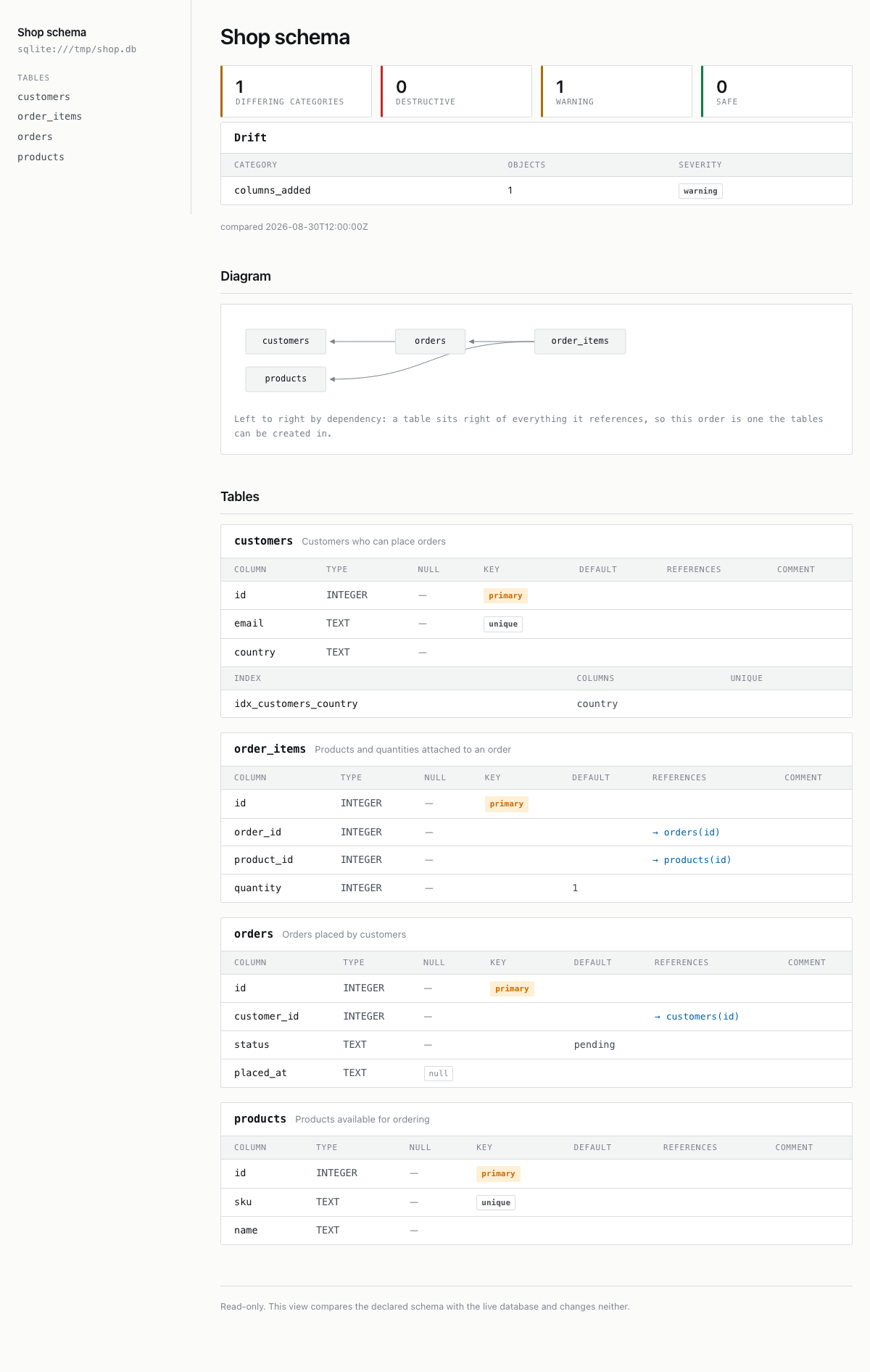
After drift: one warning category
Run ptah schema serve to watch in a browser how a live database differs from the desired schema while you change it.
ptah schema serve serves a read-only web page carrying the desired
schema and how a live database differs from it. The page re-reads both on every
request, so where ptah schema compare answers once, this keeps answering while
you work.
Use it as a second window beside the editor while you are changing models. It is
not a pipeline tool: a pipeline wants an exit code, which
ptah schema drift gives it. Nothing here
writes to the database, and no migration depends on the server having run.
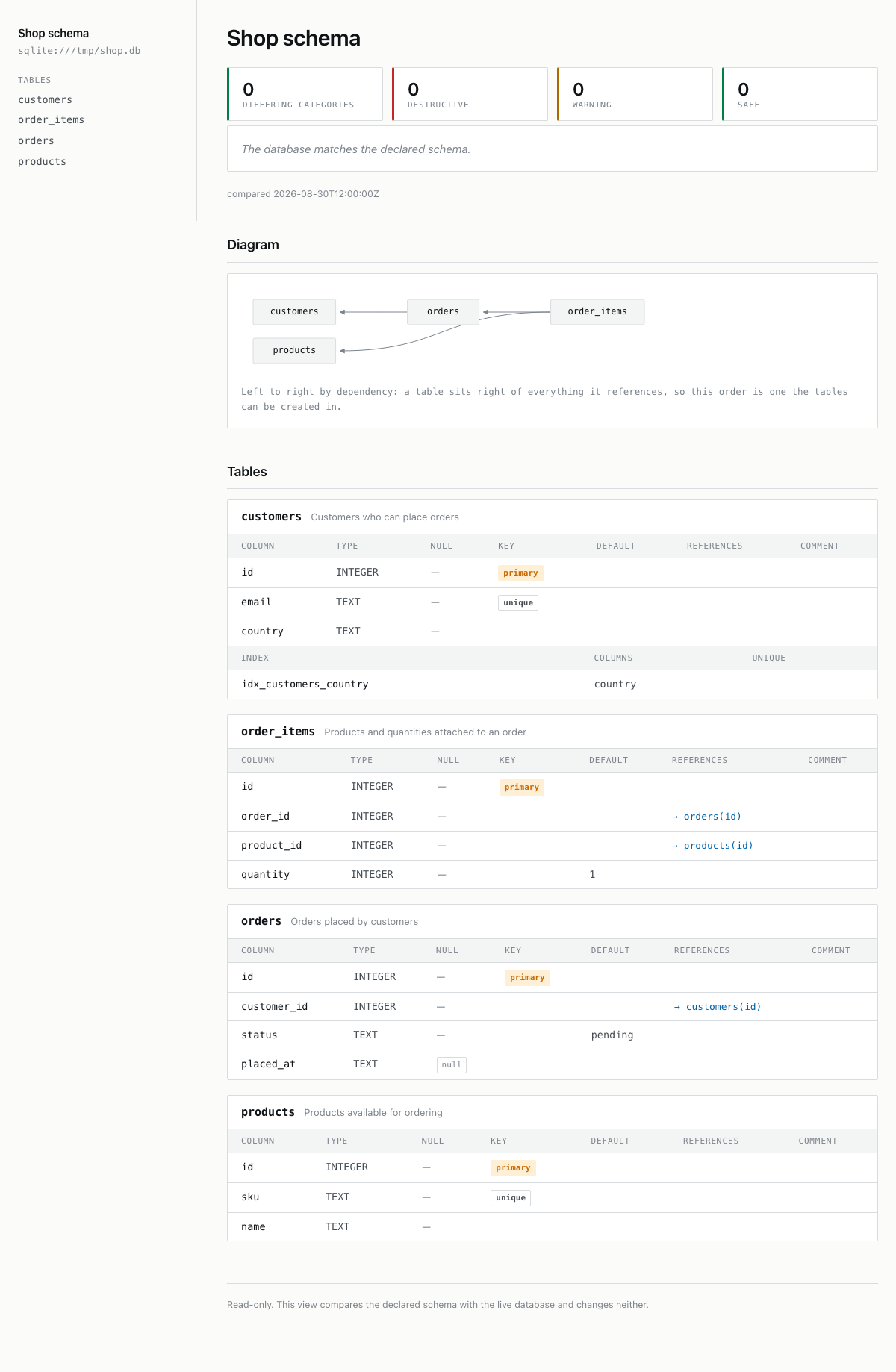
The live view before and after one desired column diverges from the SQLite database.
What to notice: Both states use the same framing: the verdict and severity counters stay above the schema diagram, while the drift state adds the exact differing category.
ptah schema serve --root-dir docs/site/fixtures/schema-ui/internal/models --db-url sqlite://shop.db --addr 127.0.0.1:7070 --refresh 0 --title 'Shop schema'After drift: one warning category
Prerequisites:
ptah binary on your machine (Install Ptah).--schema-file in SQL, YAML, HCL or DBML, or as
Go annotations under a --root-dir. An oci://
artifact is the one source this command refuses; see
Limitations.The examples use two tables and a local SQLite database that already matches
them. Save this as schema.sql:
-- schema.sqlCREATE TABLE customers (    id INTEGER PRIMARY KEY,    email TEXT NOT NULL UNIQUE);
CREATE TABLE orders (    id INTEGER PRIMARY KEY,    customer_id INTEGER NOT NULL REFERENCES customers(id));
Create the database from it:
ptah schema apply --schema-file schema.sql --db-url "sqlite://$PWD/shop.db" --auto-approveSubstitute your own schema and database URL throughout. The same two tables
written as Go annotations serve identically: pass
--root-dir ./models in place of --schema-file, or pass both to merge them.
ptah schema serve --schema-file schema.sql --db-url "sqlite://$PWD/shop.db"Expected output includes:
Serving a read-only schema view on http://127.0.0.1:7070Open the printed address in a browser. The address is read back from the
listener rather than echoed from the flag, so --addr 127.0.0.1:0 prints the
port that was actually chosen.
The page has two parts: a status panel this command adds, and the schema itself.
The status panel carries four counters — differing categories, destructive,
warning, safe — followed either by the sentence
The database matches the declared schema. or by a Drift table. Under it
sits a timestamp reading compared and a UTC time, because a live view whose
age is unknown is not a live view.
The matching view keeps the status decision above the diagram and table reference, so the first viewport answers whether action is needed.
| Drift column | What it holds |
|---|---|
| Category | The difference category, for example columns_added. |
| Objects | How many objects fall in that category. |
| Severity | safe, warning, or destructive. |
Those are the categories and severities
ptah schema drift reports, from the same
classification.
A declared object the read of the database could not check is counted as one
undecided category at warning severity, so the page does not say the
database matches. An Undecided table below the counters names each object
and the reason the read gave, for example an account that may not read the
role catalog.
Below the panel is the schema, rendered by the same code as
ptah schema export --to html: an entity diagram, then one
section per table with its columns and indexes. The sidebar names the page, the
database address with any credentials removed, and each table.
The desired schema and the database are read again for each request, so a change
to either shows up on the next page load with no restart. Replace the orders
table in schema.sql with one carrying an extra column:
CREATE TABLE orders ( id INTEGER PRIMARY KEY, customer_id INTEGER NOT NULL REFERENCES customers(id), placed_at TEXT);Reload the page. The counters read one differing category, of which one is a
warning, and the Drift table gains a row: columns_added, 1 object, severity
warning. The new column also appears in the orders section below, because
that section renders the desired schema rather than the database.
The page reloads itself every 30 seconds through a meta refresh tag and
carries no JavaScript. --refresh 15s shortens the interval; --refresh 0
serves a page that does not reload.
--title "Shop schema" replaces the default title, Schema dashboard, in the
browser tab, the heading and the sidebar.--addr selects the listen address. The default is 127.0.0.1:7070.--refresh sets the self-reload interval as a Go duration, and 0 disables
it.--root-dir is repeatable, so a schema split across directories is served
from one page.--schema-file is repeatable too, and combines with --root-dir: a schema
split across files, or across files and annotations, is served from one page.--schemas limits the database read to the named schemas, comma-separated.Each of these also reads an environment variable, printed on its --help line:
PTAH_TITLE, PTAH_ADDR, PTAH_REFRESH, PTAH_ROOT_DIR, PTAH_SCHEMA_FILE,
PTAH_SCHEMAS.
There is no JSON endpoint. The HTML is the only machine-readable answer, and
every path returns the same page, so curl on / is a complete client:
curl -s -o dashboard.html -w '%{http_code}\n' http://127.0.0.1:7070/curl -s -X POST http://127.0.0.1:7070/Expected output includes:
200this dashboard is read-onlyGET and HEAD answer; every other method gets 405 with the header
Allow: GET, HEAD. The refusal is applied before any route runs, so the surface
stays read-only whatever is added to it. Responses carry Cache-Control: no-store, since a cached copy would show drift that has since been fixed.
For a page you scrape, add --refresh 0. The meta tag is then absent and
nothing else about the response changes.
Press Ctrl-C. Ptah writes one line to stderr and exits 130:
interrupt received, releasing resources; interrupt again to stop immediatelyThe database cannot be reached. The response stays at HTTP 200 and the
counters are replaced by a banner headed The database could not be compared,
the driver’s error, and last attempt with a UTC time. Zero drift is not
rendered in that case, because a page reading zero would tell a reader their
schema is in sync when nothing was measured. The schema section keeps the last
comparison that succeeded, and before the first success there is no schema
section at all.
Three inputs stop the command before it listens, each with exit code 2:
| Message on stderr | Cause |
|---|---|
error: database URL is required |
No --db-url, and no url: in a project config in the working directory. |
error: listen on 127.0.0.1:7070: listen tcp 127.0.0.1:7070: bind: address already in use |
Another process holds the address. Pass a different --addr. |
error: oci:// schema source cannot be served: ... |
An oci:// reference passed to --schema-file. The rest of the message names ptah schema drift, which reads that source and answers once. |
oci:// artifact cannot be served. Reading the source again on every
request is this command’s whole contract, and a registry artifact fits neither
reading of it: pulling on every request puts a registry on a schedule nobody
asked for, and pulling once shows a copy that has stopped matching the
reference. The refusal happens before the server listens.
ptah schema drift takes the reference and
answers once. An external loader is absent for a separate reason: the command
registers no --schema-cmd, so render that program’s output to a file first.--schema-file nor --root-dir, the working directory is
scanned for Go annotations. Started where no annotated Go file exists, the
desired schema is empty and the whole database
reads as drift to remove: against the database built above, the panel reports
2 differing categories with 2 destructive, and rows constraints_removed
(4 objects) and tables_removed (2 objects). No schema section is drawn, and
the sidebar carries the title and the database address alone. Nothing on the
page says the desired side was empty.0 differing categories here, while ptah schema compare reports
views_added (1) for the same pair./healthz receives a full schema render
at 200, and a reverse proxy cannot route by path.127.0.0.1:7070 keeps the
page on the machine that runs it, and binding wider publishes an
unauthenticated read of the schema.--config or --env flag. A ptah.yaml or atlas.hcl in the
working directory is still read, and a malformed one stops the command before
it listens, but neither can be pointed elsewhere.Run ptah schema serve --help for every flag with its default and its
environment variable, and for the long-form note on --schema-file. The process
runs until it is interrupted: the inputs above exit 2 before it listens, and
Ctrl-C exits 130. Exit codes carries the verb’s
row and the convention behind those numbers, and
A live view carries the flag
table.