 Ptah
PtahReport schema security findings
Run ptah schema security over a live database to review privileges, owners, roles and tables with no row policy, and gate a pull request on the result.
ptah schema security reads a live database and reports findings over what the
schema declares about access: privileges granted to PUBLIC, tables reachable
by a role with no row-level security (RLS) enabled, routines that run with their
owner’s privileges, objects owned by a role that can log in, overlapping and
empty role memberships, and privileges held on objects nothing was observed
using.
Each finding is an observation paired with a suggestion, not a verdict. Use the command to put those observations in front of a person, and to gate a pull request once you have decided which of them should never appear again.
The live-database command prints the complete report. When you need to locate
the same class of findings on an entity diagram, ptah viz --security applies
the rules to Go-annotated models and marks the table nodes it can attach to:
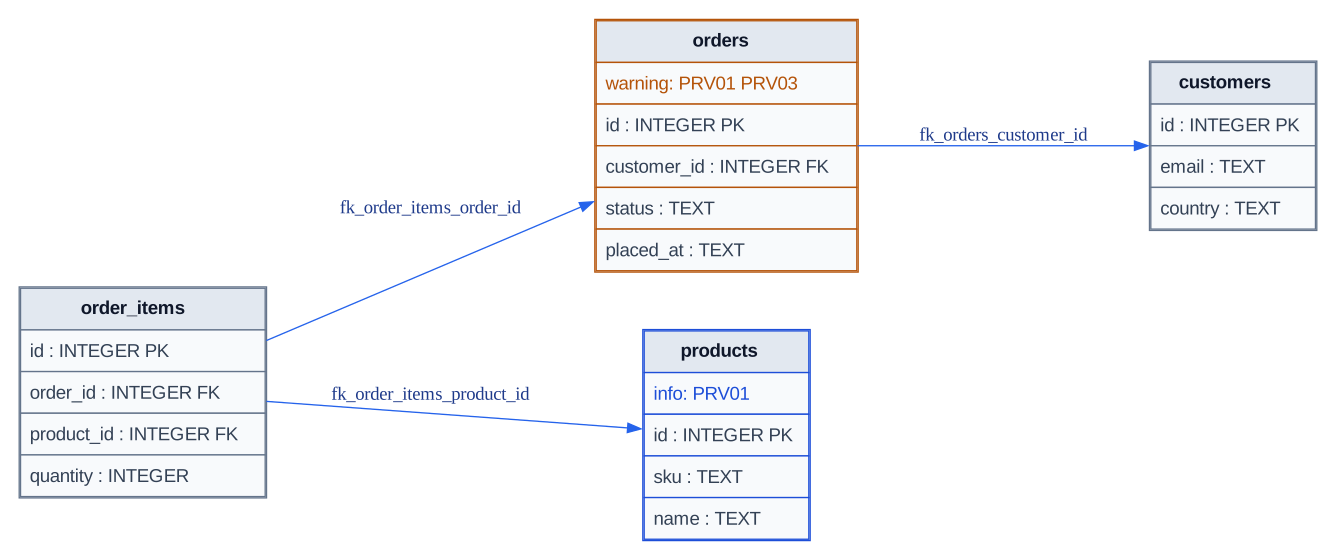
Real `ptah viz --security` output connects findings to tables without hiding findings that have no table node.
What to notice: Orders shows two warning codes, products shows an informational code, and the DOT comment retains the SECURITY DEFINER routine finding; the command report remains the complete answer.
Reproduce this output
ptah viz --root-dir docs/site/fixtures/schema-ui/internal/models --format svg --include-columns --security --dialect postgres > schema-security.svgAmber is warning, blue is info, and neutral nodes have no attached finding.
See Visualize the schema
for the Mermaid limitation and the complete diagram-output contract.
Prerequisites: an installed ptah binary (Install Ptah)
and the URL of the database to read. The command registers --db-url,
--fail-on, --format, --role-usage and --schemas, and nothing else: there
is no --dialect and no schema-source flag, so it reads a live database and
takes its dialect from the connection. See
Database URLs and dev databases
for the URL forms --db-url accepts.
Starting state
Section titled “Starting state”Findings need an engine that models roles and grants. The examples run against
a PostgreSQL database whose connecting role is ptah. Seed it:
CREATE TABLE customers (  id integer PRIMARY KEY,  email text NOT NULL);
CREATE TABLE orders (  id integer PRIMARY KEY,  customer_id integer NOT NULL REFERENCES customers (id),  total_cents integer NOT NULL DEFAULT 0);
CREATE ROLE reporting LOGIN PASSWORD 'reporting';GRANT SELECT ON orders TO reporting;GRANT SELECT ON customers TO PUBLIC;
CREATE FUNCTION bump(n integer) RETURNS integer  LANGUAGE sql SECURITY DEFINER  AS $$ SELECT n + 1 $$;
Put that database’s URL in DATABASE_URL and substitute your own throughout.
The role names in the output below are the ones this seed creates; a database
whose owning role has another name shows that name instead.
Read the findings
Section titled “Read the findings”ptah schema security --db-url "$DATABASE_URL"Expected output includes:
CODE   SEVERITY  OBJECT           FINDINGOWN01  info      role ptah        role ptah can log in and owns 2 object(s), so whoever holds its password can drop or alter themPRV01  info      table customers  table customers is granted to a role and has no row-level security enabled, so a granted role reads every rowPRV01  info      table orders     table orders is granted to a role and has no row-level security enabled, so a granted role reads every rowPRV02  info      routine bump     routine bump runs as its owner, so every caller that may execute it acts with the owner's privilegesPRV03  warning   table customers  privileges on table customers are granted to PUBLIC, which every role holds
Suggested:  OWN01 ptah: own them with a role that cannot log in and grant membership in it instead  PRV01 customers: enable row-level security and declare a policy, or record that the whole table is meant to be readable by these roles  PRV01 orders: enable row-level security and declare a policy, or record that the whole table is meant to be readable by these roles  PRV02 bump: qualify the object names in its body or pin search_path, and grant EXECUTE only to roles that should act as the owner  PRV03 customers: grant to a named role and let members inherit it, so the grant names who holds it
0 error, 1 warning, 4 info
Not checked here:  ROL01: no role usage data was supplied; a privilege is not use, and no catalog records which roles read which objects
Findings carry the codes PRV01, PRV02, PRV03, ROL01, ROL03, ROL04
and OWN01.
Schema security findings
carries what each code reports, the severity it uses, and which engines supply
the catalog it reads. Ptah’s migration and SQL linters report under a separate
set of identifiers, enumerated on Lint rules; no
code named on this page appears there.
--format json emits the same three parts as a document, under the keys
findings, summary and skipped_rules. Each finding carries its code,
severity, subject, message, the detail its suggestion names, and the
suggestion itself, so a pipeline can group or diff findings without reading
prose.
What a finding means
Section titled “What a finding means”A finding describes the access the schema declares. It is not a verdict.
OWN01 fires on a default PostgreSQL database because the creating role owns
what it created, and PRV01 fires wherever a table is granted without a row
policy, which is most tables on most databases. Both are info for that reason:
they describe a shape, and a person decides whether that shape is intended here.
A clean report is not a security clearance. The analysis reads what Ptah models, attempts no access, and cannot see a privilege granted on an object outside the schema it read. “Nothing here matched a rule” is the claim it makes. Whether the database is secure is a question this command does not answer, and running it does not replace a security review.
Read the skipped rules
Section titled “Read the skipped rules”A rule that could not run is named with its reason under Not checked here:,
because a skipped rule and a rule that found nothing produce the same finding
list. On a target that models neither roles nor row-level security, that block
is most of the answer. Any SQLite database reports it, an empty one included:
ptah schema security --db-url sqlite://shop.dbExpected output includes:
No security findings.
Not checked here:  PRV01: the target does not model row-level security  ROL01: no role usage data was supplied; a privilege is not use, and no catalog records which roles read which objects
Supply role usage so ROL01 can run
Section titled “Supply role usage so ROL01 can run”ROL01 reports a role holding privileges on an object it was not observed
using. No catalog records that: a role holding SELECT on a table it has never
read looks identical to one that reads it hourly. The observation is therefore
supplied rather than read. --role-usage takes a JSON file of what something
else saw, such as an audit stream or a proxy log. Save the observations as
role-usage.json:
[{"role": "reporting", "kind": "table", "name": "orders"}]ptah schema security --db-url "$DATABASE_URL" --role-usage role-usage.jsonExpected output includes:
ROL01 warning table customers role ptah holds privileges on table customers, which it was not observed usingROL01 warning table orders role ptah holds privileges on table orders, which it was not observed usingThe file records reporting reading orders, so that grant is not reported.
The owning role ptah is reported because nothing recorded it using anything.
Each of those two lines repeats once per privilege the role holds on the table,
which is why the run prints 14 of them; see Limitations.
An empty list is a different answer from no file at all. It says the window was
observed and nothing used anything, so every grant inside it is unused. Without
the flag, ROL01 reports itself skipped rather than passing quietly.
Gate a pull request on findings
Section titled “Gate a pull request on findings”--fail-on sets the threshold that controls the exit code, and takes error
(the default), any, or none:
ptah schema security --db-url "$DATABASE_URL" --fail-on anyecho "exit: $?"Expected output includes:
exit: 1See Exit codes for what 0, 1 and 2 mean
across native commands.
Limitations
Section titled “Limitations”- No rule reports at
errorseverity, so--fail-on errornever changes the exit code. ROL01reports one finding per privilege rather than one per object. A single unused grant on a table carrying seven privileges produces seven identical lines; the run above produces 14 for two tables. Group the JSON output before reading a report.- A
--schemasvalue naming a schema that does not exist reportsNo security findings.and exits0. Check the name againstptah db readbefore trusting an empty report. - An entry in the
--role-usagefile whosekindnames nothing Ptah models is accepted and matches nothing, so every grant reads as unused. Changing"kind": "table"to"kind": "relation"in the file above takes the run from 14ROL01lines to 15, with nothing reported about the unrecognized value. - The target is a live database. There is no
--root-dirand no--schema-file, so a desired schema cannot be analyzed before it is applied.
Exact reference
Section titled “Exact reference”Run ptah schema security --help for the flag set with its environment
variables.
Schema security findings
carries every rule code with its severity and the engines that supply the
catalog it reads, and Exit codes carries the
verb’s row.
Next steps
Section titled “Next steps”- Ready to change the privileges a finding named? Apply directly.
- Want the findings drawn on the schema diagram? Visualize the schema.
- Counting what the same database holds? Count schema objects.