Ptah
Ptah
Exclude the products table
Render entity-relationship diagrams from the desired schema as Mermaid, DOT, or SVG with ptah viz.
ptah viz draws the desired schema from whatever describes it: annotated Go
entities under --root-dir, or a SQL, YAML, HCL, DBML or OCI source under
--schema-file. Both flags repeat, and both combine into one diagram. The
output is Mermaid erDiagram, Graphviz DOT, or SVG. For an HTML reference with
an embedded diagram, use schema export instead.
A diagram carries entities and the foreign keys between them, so what a source contributes here is what it says about tables and their references. A source that describes no foreign keys draws no edges, whatever else it declares.
Mermaid is the default. This rendered diagram is built from the exact Mermaid stdout produced by the command below:

Default Mermaid output rendered from the compact four-table documentation fixture.
What to notice: The default keeps only table names and relationships, so the three foreign-key paths remain readable in the first viewport.
ptah viz --root-dir docs/site/fixtures/schema-ui/internal/models > schema-relationships.mmdPrerequisites: a built ptah binary. Graphviz dot is needed only when Ptah
itself renders --format svg; Mermaid and DOT source need no extra tool.
Regenerating this page’s committed samples needs Docker instead, because the
SVGs are drawn in a pinned environment rather than by whichever Graphviz the
machine happens to carry.
Each of these draws the schema its source describes:
ptah viz --schema-file schema.sql --dialect postgresptah viz --schema-file schema.yamlptah viz --schema-file schema.hclptah viz --schema-file schema.dbmlptah viz --root-dir ./models--dialect decides how a .sql source is parsed and which security rules can
run. With no source at all, the current directory is scanned for annotated Go
entities, which is what a run in a models package gets.
Sources merge, which is how a vendored table joins a schema you own:
ptah viz --root-dir ./models --schema-file vendor.hclscripts/check-source-equivalence.sh holds this to one answer: the canonical
fixture written as SQL, YAML, HCL, DBML and Go annotations draws a
byte-identical diagram from all five.
From a Ptah checkout, reproduce the compact diagram above:
ptah viz --root-dir docs/site/fixtures/schema-ui/internal/modelsExpected output includes:
erDiagram customers { } order_items { } orders ||--o{ order_items : "fk_order_items_order_id" products ||--o{ order_items : "fk_order_items_product_id" customers ||--o{ orders : "fk_orders_customer_id"The default keeps empty entity blocks and the foreign-key edges. Add
--include-columns when the field-level rows matter. Point --root-dir at
your own annotated models the same way.

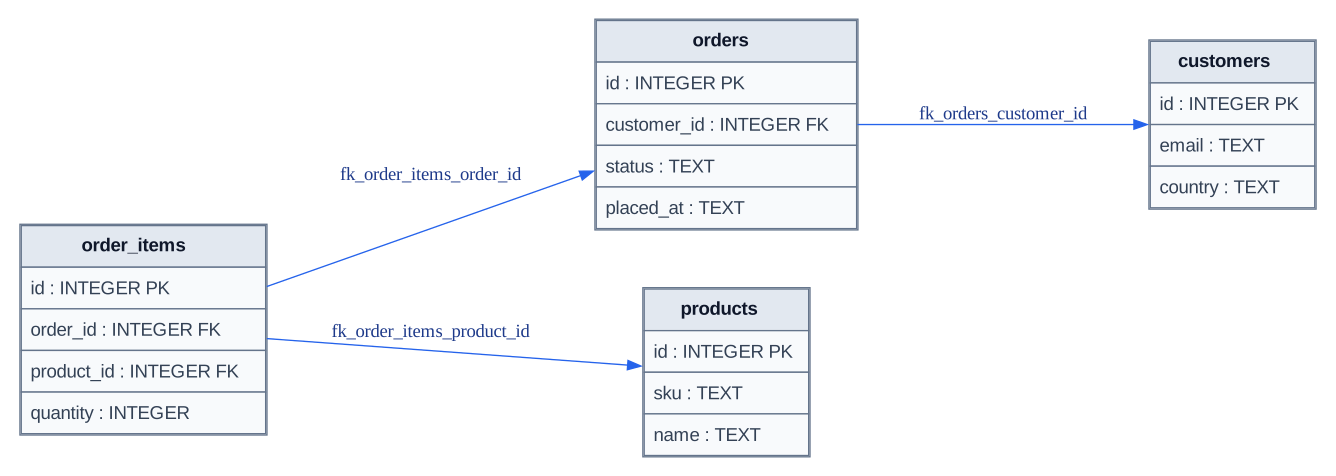
Adding `--include-columns` turns the relationship map into a field-level review artifact.
What to notice: Primary-key and foreign-key markers make the join columns explicit without expanding to the seven-table stress fixture.
ptah viz --root-dir docs/site/fixtures/schema-ui/internal/models --include-columns > schema-columns.mmdExclude the products table
The excluded-table artifact comes from:
ptah viz --root-dir docs/site/fixtures/schema-ui/internal/models \ --exclude-tables products| Format | Use when |
|---|---|
| Mermaid | You want Markdown-friendly diagrams. |
| DOT | You want Graphviz source for another renderer. |
| SVG | You want a committed image artifact. |
ptah viz --root-dir ./models --format dot --include-columns > schema.dotptah viz --root-dir ./models --format svg --include-columns --theme dark > schema.svgFor the exact compact fixture, download the generated DOT source or rendered SVG. The Mermaid sources and rendered SVGs are available from the preview actions above, so inspecting an artifact does not require browsing the repository.
DOT output starts with digraph ptah_schema. SVG output shells out to
Graphviz dot; --theme selects light (default) or dark colors.
The DOT above is what Ptah writes, and running the command reproduces it
exactly. The committed SVG is a different kind of artifact: Graphviz draws
it, and its bytes depend on the Graphviz build and on the fonts installed beside
it — at one Graphviz version, the same DOT lays out 928pt wide with no font
package and 1002pt with DejaVu present. Running --format svg locally therefore
gives a correct diagram with different bytes, which is the expected outcome
rather than a fault.
So the committed copy names its renderer rather than claiming to be
reproducible by hand: it is drawn by docs/site/graphviz/Dockerfile, an image
this repository builds and pins by digest, and npm run assets:write renders
through it. ptah viz --format svg is exactly dot -Tsvg of
ptah viz --format dot, so the command on this page and the committed file
describe the same diagram from the same source.
--include-columns adds each table’s columns with primary-key and
foreign-key markers. Without it, the diagram shows only tables and
relationships.--exclude-tables takes comma-separated table names to omit, which keeps
join tables or audit tables from drowning the interesting edges:ptah viz --root-dir ./models --exclude-tables task_comments,task_tags--security runs the schema security rules
over the same schema and marks the tables they attach to, so the diagram shows
where the findings are instead of sending the reader to a separate report. For
the findings as a report over a live database, with the codes a rule reports and
a --fail-on gate, use
ptah schema security:
ptah viz --root-dir docs/site/fixtures/schema-ui/internal/models \ --format svg --include-columns --security --dialect postgres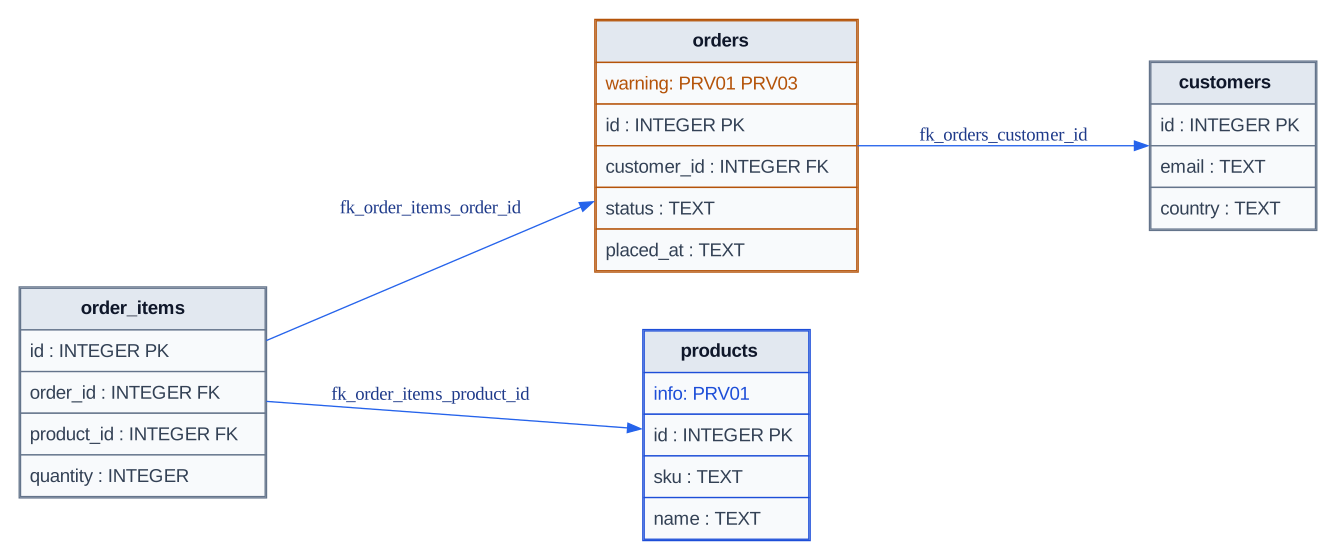
Real `ptah viz --security` output locates table findings; comments in the source retain findings that have no table node.
What to notice: Orders carries two codes at warning severity, products carries an informational code, and the DOT source names the unattached SECURITY DEFINER routine finding. The full security report remains authoritative.
ptah viz --root-dir docs/site/fixtures/schema-ui/internal/models --format svg --include-columns --security --dialect postgres > schema-security.svgLegend: amber is warning; blue is info; the neutral nodes have no attached
finding. The diagram locates findings, while
ptah schema security provides the complete messages,
suggestions, skipped-rule evidence, and gateable exit code.
A marked node is drawn in its severity’s color and carries a row naming the codes:
"audit_log" [label=< <TABLE BORDER="1" CELLBORDER="1" CELLSPACING="0" CELLPADDING="6" COLOR="#b45309"> <TR><TD BGCOLOR="#e2e8f0"><FONT COLOR="#0f172a"><B>audit_log</B></FONT></TD></TR> <TR><TD ALIGN="LEFT" BGCOLOR="#f8fafc"><FONT COLOR="#b45309">warning: PRV03</FONT></TD></TR> </TABLE> >];Where a node is found by two rules, the row lists both codes and the color is the worse severity.
--dialect (default postgres) decides which rules can run, and
--server-version names the server that dialect stands for. Both belong to
ptah viz. ptah schema security registers neither and takes
its dialect from the database --db-url names.
Measured on this tree, the one capability a rule reads — row-level security — varies by dialect and not within any release line, so the version changes no answer. It is read so the rules see the target the operator named rather than the dialect default. A rule that cannot be answered on the target is named in a comment rather than passed over:
// PRV01 not checked here: the target does not model row-level securityFindings about objects an entity diagram has no node for — a routine, a schema — are written the same way, so the diagram never shows three of five findings without saying so:
// routine escalate: info PRV02Mermaid carries the annotations as comments. erDiagram has neither
per-entity styling nor a display name, so a mark cannot be drawn on the node
there. The %% lines beside each entity carry every finding, and --format dot
or --format svg is what draws them.
examples/viz
keeps generated artifacts in the repository so diagram output stays reviewable:
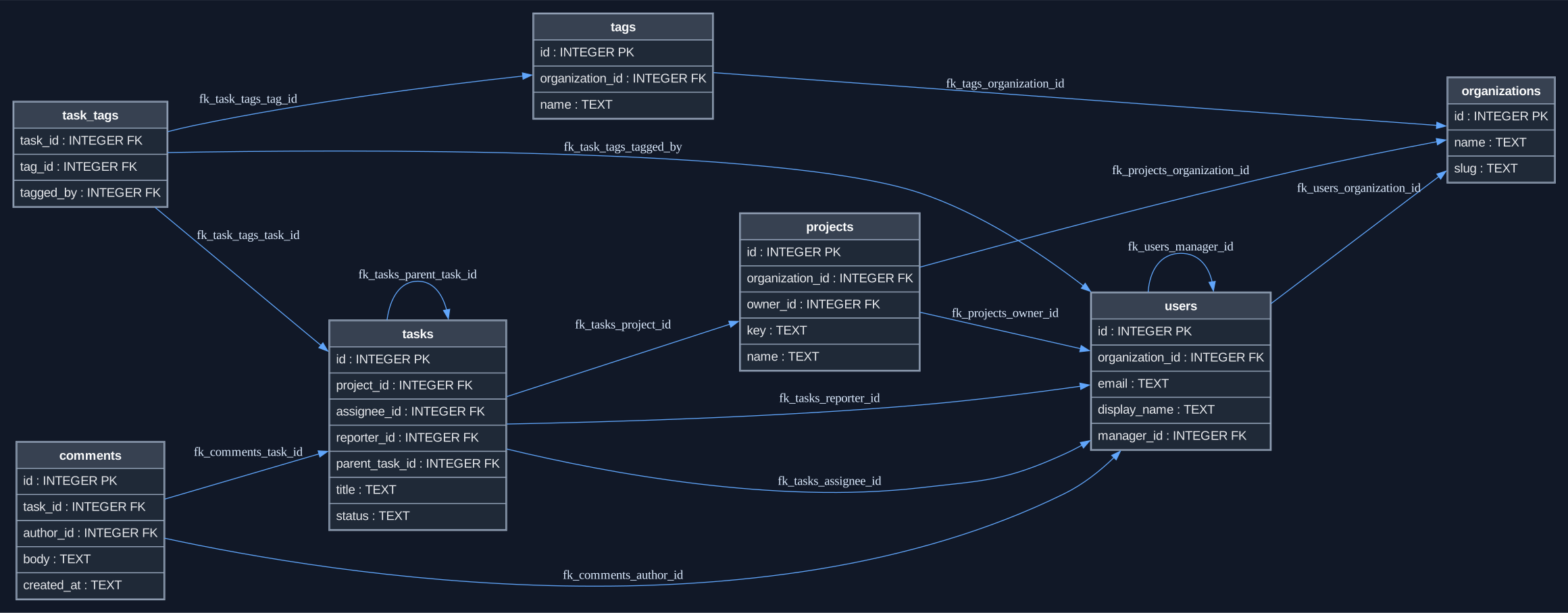
Use this full-size stress fixture to review dense layouts; the compact fixture above remains the primary inline example.
| File | Purpose |
|---|---|
schema.sql |
The SQLite input schema. |
models/schema.go |
Annotated Go model generated from it by ptah introspect. |
schema.mmd |
Mermaid erDiagram output. |
schema.dot |
Graphviz DOT output. |
schema.svg |
Dark-theme SVG rendered through Graphviz. |
After regenerating, compare the committed artifacts:
git diff -- examples/viz/schema.mmd examples/viz/schema.dot examples/viz/schema.svgThe example should show a connected schema with readable table names, relationships, and columns. A diagram that renders but loses relationships is a bug in the visualization path, not an acceptable example.
--format svg without Graphviz installed fails with
Graphviz dot is required for --format svg; install graphviz or use --format dot.
See Troubleshooting.ptah introspect — the committed example does
exactly that — or inspect it into a schema file and pass that file to
--schema-file.type = INTEGER in
HCL renders INTEGER and id integer in SQL renders integer, so two
documents describing one schema can differ under --include-columns while
drawing the same tables and the same edges.ptah schema export --to html instead.ptah introspect.