 Ptah
PtahDeliver a schema change
Follow one schema change from a reviewed pull request to a verified database, and see which guide owns each stage.
Run checks in CI ends where a pull request is approved. This page starts there and ends at a database whose state has been observed after the change. It owns the sequence, not the detail: each stage links to the guide that owns it.
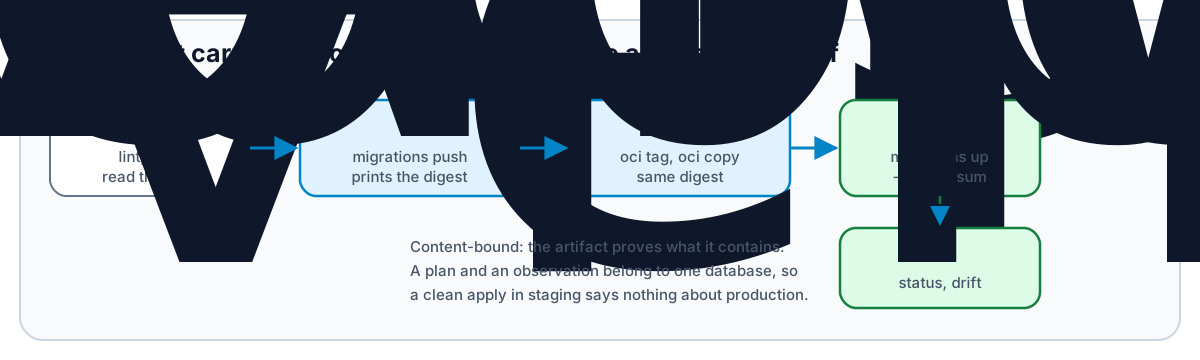
The sequence
Section titled “The sequence”| Stage | Consumes | Produces | Proves |
|---|---|---|---|
| Review | The migration files or the desired schema | An approved pull request | The change was read by a person, and lint and tests passed on those bytes |
| Publish | The reviewed directory | An OCI artifact and its manifest digest | The bytes that ship are the bytes that were reviewed |
| Promote | The digest | A tag in the target environment’s repository | The same artifact reaches the next environment |
| Apply | The digest and a database URL | Applied revisions | The database executed those statements |
| Verify | The database | An observation | The database is in the state the change intended |
The stages after Review are content-bound except the last two. An artifact proves what it contains; it cannot prove anything about a database it has not been applied to.
Publish the reviewed directory
Section titled “Publish the reviewed directory”Hash and verify before uploading, then publish. The command prints the manifest digest, which is the only identifier worth carrying forward:
ptah migrations hash --dir ./migrations
ptah migrations push \  oci://ghcr.io/acme/app-migrations \  --migrations-dir ./migrations \  --dir-format ptah \  --verify-sum \  --tag stable
--verify-sum makes a missing integrity file an error rather than a warning. A
mismatched integrity file fails before the upload either way.
OCI registry artifacts covers authentication, private registries, and attaching lint and plan reports to the artifact.
Resolve the tag once, then carry the digest
Section titled “Resolve the tag once, then carry the digest”A tag moves. Resolve it at the start of a deployment and use the digest for every later step, so a retag between two commands cannot change what is applied halfway through:
MIGRATIONS=oci://ghcr.io/acme/app-migrations@sha256:0123456789abcdef0123456789abcdef0123456789abcdef0123456789abcdef
ptah migrations status \  --db-url "$DATABASE_URL" \  --migrations-dir "$MIGRATIONS" \  --json
ptah oci tag moves an alias without rebuilding the artifact, and ptah oci copy preserves the manifest digest across repositories. Attached reports stay
at the source unless the copy is recursive, so a destination that must carry
its lint or plan evidence needs --recursive.
Promotion moves an artifact. It does not move a plan or an observation: both of those are specific to the database they were made against, so staging’s clean apply is not evidence about production.
Promote between environments
Section titled “Promote between environments”ptah oci tag moves an alias inside one repository. ptah oci copy moves the
artifact to another repository, which is what a separate per-environment
registry needs, and it preserves the manifest digest: the artifact staging
approved is the artifact production applies, byte for byte.
ptah oci copy \ oci://ghcr.io/acme/app-migrations@sha256:0123... \ oci://registry.internal/prod/app-migrations \ --recursive--recursive carries the artifact’s referrers with it. Without it the copy
takes the artifact alone and the lint and plan reports attached to it stay at
the source, so a production registry that must hold its own evidence needs the
flag. ptah oci verify then checks the destination against a verification
policy before anything consumes it.
What does not travel:
- An approval. It was given for a plan against one database.
- An observation.
migrations statusandschema driftanswer for the database they read, so staging’s clean result is not evidence about production. - A plan. It binds the artifact to a target’s observed state, and the next target has its own.
So each environment repeats apply and verify against its own database. What promotion saves is the review, not the run.
ptah migrations up \ --db-url "$DATABASE_URL" \ --migrations-dir "$MIGRATIONS" \ --verify-sumptah migrations down accepts the same pinned source. Moving a tag backwards
is not a rollback: the database has already executed the statements, so
reversing them is a rollback or a forward repair,
decided by what the failed change did.
Ptah publishes a deployment record to the registry after a successful apply.
That upload is best-effort, and its failure does not mean the migration failed.
Read the exit code of the apply, not the presence of the record, and use
--skip-report where the deploy credential has no push rights.
Verify
Section titled “Verify”An apply that exits 0 reports that the statements ran. Whether the database
now matches the schema the change intended is a separate question, and drift
detection is what answers it:
ptah migrations status --db-url "$DATABASE_URL" --migrations-dir "$MIGRATIONS"ptah schema drift --db-url "$DATABASE_URL" --schema-file schema.sqlDirect schema changes take a different path
Section titled “Direct schema changes take a different path”The versioned path above ships a reviewed directory. A directly managed schema
ships a desired state instead: publish it with ptah schema push, and apply it
with a reviewed plan and, where configured, an approval. See
Apply a direct schema change.
A direct change produces no migration history. Do not describe it as one, and
do not expect ptah migrations status to report on it.
Where the apply runs
Section titled “Where the apply runs”The commands above, in a job that holds a database credential and the digest. This is the path that works everywhere, including a platform with no Ptah integration.
The Ptah Operator reconciles a desired schema from an OCI artifact continuously, with plans and approvals as cluster resources.
It does not apply a versioned migration directory: PtahSchema reconciles a
desired schema, and a versioned-migration controller does not exist yet. On the
versioned path the operator does not replace the apply step above.
A GitOps controller syncs Kubernetes objects; it does not run migrations. Two shapes work, and which one fits depends on the workflow rather than on the controller.
A desired schema is the shape GitOps already fits. Commit the PtahSchema
resource, let Argo CD or Flux sync it, and the operator reconciles from there.
Convergence is the operator’s job and the controller only has to deliver the
resource.
A versioned directory needs a Job that runs ptah migrations up against
the pinned digest, ordered before the workload that depends on the new schema.
Argo CD runs it as a PreSync hook; Flux orders it with dependsOn between
Kustomizations. In both cases the Job image is ghcr.io/stokaro/ptah pinned by
digest, and the migration reference is a digest for the reason above: a
controller re-syncs, and a tag that moved between two syncs would apply
something nobody reviewed.
Neither controller reports whether the database converged. The Job’s exit code does, and the verify step is still yours to run.